

Description
2GIS for Chrome: Instant Business Info on Any Page
Overview
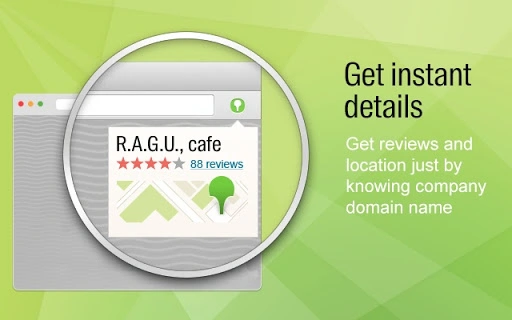
2GIS for Chrome is a browser extension designed to deliver real-time business information directly from any web page. It transforms standard browsing into a powerful research and navigation tool by overlaying key details about companies, including working hours, phone numbers, ratings, reviews, and precise location data. The tool is particularly useful for professionals and consumers who need quick access to reliable business data while researching products, services, or local establishments. Whether you're comparing competitors, verifying contact details, or planning a visit, the extension streamlines the process by eliminating the need to switch between multiple platforms.
Target users include small business owners, sales professionals, travel planners, and everyday individuals seeking trustworthy information about local services. The extension integrates seamlessly with the Chrome browser, enabling users to access business details without leaving their current context. The developer, 2GIS, is known for its comprehensive business directory and mapping services, though specific background details were not provided in the input. Real-world usage scenarios include checking restaurant hours while reading a food blog, verifying a contractor’s address during a forum discussion, or calling a service provider directly from a listing.
Key Features & Capabilities
- Real-Time Business Data Integration – The extension pulls up-to-date information about companies from the 2GIS database, including working hours, ratings, and reviews, ensuring users receive accurate and current details.
- On-Page Highlighting of Contact Information – Phone numbers are automatically detected and highlighted, allowing users to initiate calls directly from the web page, with the option to route the call to their smartphone.
- Location and Navigation Support – Users can view exact addresses and access turn-by-turn directions, simplifying the process of finding physical locations without manual search.
- Seamless Browser Integration – The tool operates within the Chrome environment, providing instant access to business details without requiring a separate application or login.
- Universal Search Across Global Businesses – Access information on a vast number of companies worldwide, making it a valuable asset for international research and travel planning.
These capabilities enhance workflow efficiency by reducing time spent on information gathering. For example, a sales representative researching potential clients can verify a company’s contact details and location in seconds. Similarly, a traveler can confirm a hotel’s operating hours while browsing a travel site. The extension’s design prioritizes speed and usability, making it ideal for on-the-go decision-making.
User Interface, Workflow & Performance
The user interface of 2GIS for Chrome is minimal and context-aware, designed to operate unobtrusively within the browser environment. When activated, it displays business details in a clean, compact panel that appears directly on the webpage, preserving the user’s focus on the original content. Navigation is intuitive, with clearly labeled sections for contact, location, and reviews. The workflow is streamlined: simply hover over or click on a highlighted phone number to trigger a call, or view the full business profile with one click.
Performance is optimized for speed, with quick load times and low latency when retrieving data. The developer did not specify resource usage details, but the extension’s 3.5 MB size suggests a lightweight footprint. Stability appears consistent with typical Chrome extensions, though exact behavior under heavy multitasking was not documented. Users can expect smooth operation across various web pages, including news sites, forums, and e-commerce platforms. The extension does not interfere with page rendering or browser responsiveness, maintaining a reliable user experience.
Compatibility & System Requirements
2GIS for Chrome is compatible with Windows, Mac, and Linux operating systems, ensuring broad accessibility across desktop environments. It is designed specifically for the Chrome browser, meaning it functions exclusively within that ecosystem. The installation size is 3.5 MB, which is relatively small and suitable for users with limited storage space.
Exact system requirements were not listed. However, the extension is expected to function on devices meeting the standard Chrome browser requirements. The developer did not provide additional system requirements, so users should ensure their system supports the latest version of Chrome. Compatibility information is limited to the operating systems and browser platform specified.
Pros and Cons
Pros
- Provides instant access to verified business details on any webpage
- Supports direct calling from highlighted phone numbers
- Offers accurate location data and navigation options
- Lightweight and fast, with minimal impact on browser performance
- Works across Windows, Mac, and Linux systems
Cons
- Available only for Chrome, limiting cross-browser use
- Relies entirely on the 2GIS database; coverage may vary by region
- No offline functionality or data caching available
- Does not support custom data entry or user contributions
FAQ Section
Is 2GIS for Chrome available for browsers other than Chrome?
The extension is currently designed exclusively for the Chrome browser. No versions for Firefox, Edge, or Safari were mentioned in the provided information.
Is the extension secure to use?
As a browser extension from 2GIS, it operates under Chrome’s security framework. It accesses only the necessary data from the web page and does not store personal information without user consent. Users should review permissions during installation.
How often is the business data updated?
The extension pulls data from the 2GIS database, which is maintained in real time. However, exact update frequency was not specified in the input.
Can I use 2GIS for Chrome without an internet connection?
Offline usage is not supported. The extension requires an active internet connection to retrieve business information from the 2GIS servers.
What type of license does the extension use?
2GIS for Chrome is available at no cost. The developer did not specify a license type beyond indicating it is free to use.
Final Thoughts & CTA
2GIS for Chrome stands out as a practical, efficient tool for anyone who needs fast, accurate business information while browsing the web. Its ability to deliver real-time data—ranging from contact details to navigation links—without leaving the current page makes it a valuable addition to any digital workflow. The seamless integration with Chrome, lightweight design, and cross-platform support enhance its usability across diverse environments.
While it is limited to the Chrome browser and depends on external data sources, these constraints are balanced by its core strengths: speed, reliability, and ease of use. Professionals and casual users alike will benefit from the time saved in verifying business details and making contact. For those seeking a smart, no-frills way to access business data on the fly, this extension delivers on its promise.
Download 2GIS for Chrome now and turn every webpage into a powerful research hub.
Guides & Tutorials for 2GIS Extension for Chrome
How to install 2GIS Extension for Chrome
- Click the Preview / Download button above.
- Once redirected, accept the terms and click Install.
- Wait for the 2GIS Extension for Chrome download to finish on your device.
How to use 2GIS Extension for Chrome
This software is primarily used for its core features described above. Open the app after installation to explore its capabilities.
User Reviews for 2GIS Extension for Chrome 0
No reviews found





